Malware Memory Forensics
| Memory Forensics is the analysis of the memory image taken from the running computer. In this article, we will learn how to use Memory Forensic Toolkits such as Volatility to analyze the memory artifacts with practical real life forensics scenario. |
 |
| This article is the part of our free "Reverse Engineering & Malware Analysis Course". You can visit our training page here and all the presentations of previous sessions here |
| Why Memory Forensics? |
| Memory forensics can help in
extracting forensics artifacts from a computer's memory like running
process, network connections, loaded modules etc etc. It can also help
in unpacking, rootkit detection and reverse engineering. Below are the list of steps involved in memory forensics |
|
| Volatility - A Quick Overview |
| Volatility is an advanced memory forensic framework written in python. It can be installed on multiple operating systems (Windows, Linux, Mac OS X), Installation details of volatility can be found here. |
| Volatility Syntax & Usage |
* using -h or --help option will display help options and list of a available plugins
example: python vol.py -h
* Use -f
|
| Demonstation - Memory Forensics |
| In order to understand memory forensics and the steps involved. I have created a scenario, our analysis and flow will be based on the below scenario. |
| Demo Scenario |
| Your security device alerts, show malicious http connection to ip address 208.91.197.54 from a source ip 192.168.1.100 on 8th june 2012 at around 13:30hrs...you are asked to investigate and do memory forensics on that machine 192.168.1.100 |
| Preperation Steps |
| To start with, acquire the memory image from 192.168.1.100, using memory acquistion tools. for the sake of demo, the memory dump file is named as "infected.dmp". |
| Demonstation - Memory Analysis |
| Now that we have acquired "infected.dmp", lets start our analysis |
| Step 1: Start with what you know |
| We know from the security device alert that the host was making an http connection to 208.91.197.54. so lets look at the network connections. Volatility's connections module, shows connection to the malicious ip made by pid 1748 |
 |
| Step 2: Info about 208.91.197.54 |
| Google search shows this ip 208.91.197.54 to be associated with malware, probably "SpyEye", we need to confirm that yet. |
 |
| Step 3: Who is Pid 1748? |
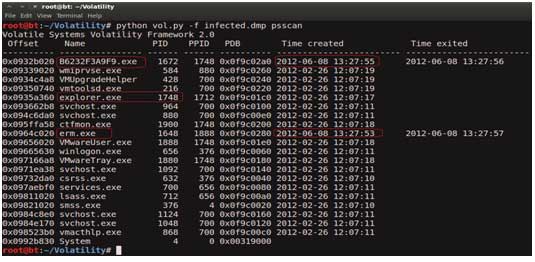
| Since the network connection to the ip 208.91.197.54 was made by pid 1748, we need to determine which process is associated with pid 1748. "psscan" shows pid 1748 belongs to explorer.exe, also two process created during same time reported by security device (i.e june 8th 2012) |
 |
| Step 4: Process handles of explorer.exe |
| Now that we know explorer.exe (which is an operating system
process) was making connections to the malicious ip, there is a
possibility that explorer.exe is infected. Lets looks at the process handles of explorer.exe. The below screenshot shows Explorer.exe opens a handle to the B6232F3A9F9.exe, indicating explorer.exe might have created that process, which might also be malicious…Lets focus on explorer.exe for now |
 |
| Step 5: API Hooks in explorer.exe |
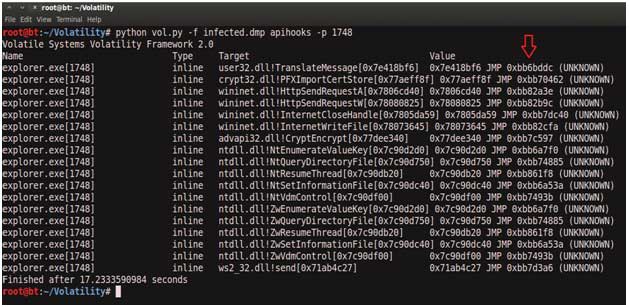
| APIhooks module show, inline API hooks in explorer.exe and jump to an unknown location |
 |
| Step 6: Exploring the Hooks |
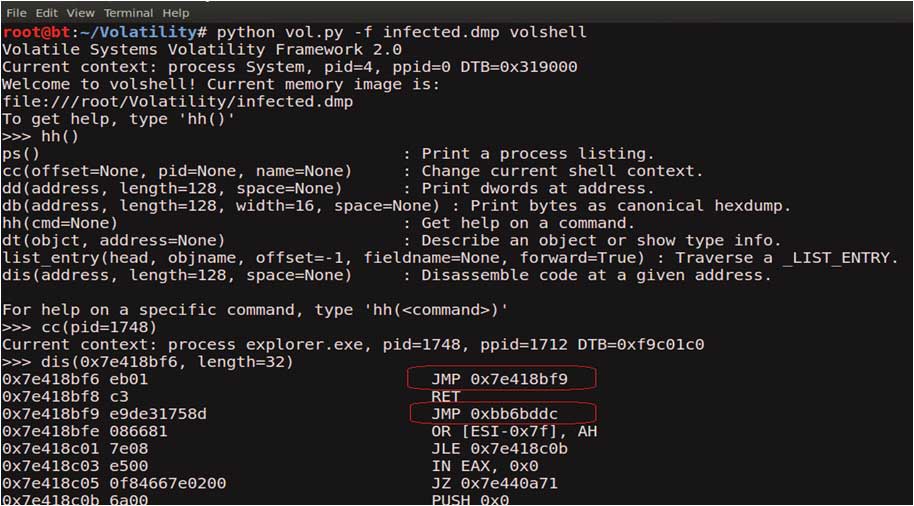
| Disassembled hooked function (TranslateMessage), shows a short jump and then a long jump to malware location |
 |
| Step 7: Embedded EXE in explorer.exe |
| Printing the bytes at the hooked location, show the presence of embedded executable in explorer.exe |
 |
| Step 8: Dumping the embedded EXE |
| VadDump tool dumps the embedded exe from explorer.exe |
 |
 |
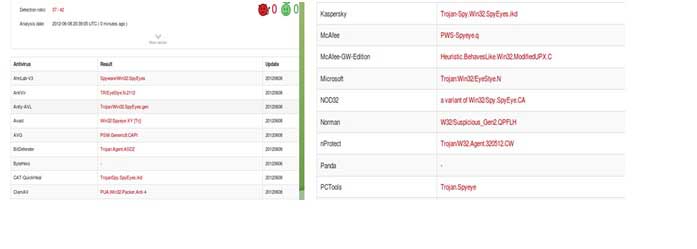
| Step 9: VirusTotal Submission |
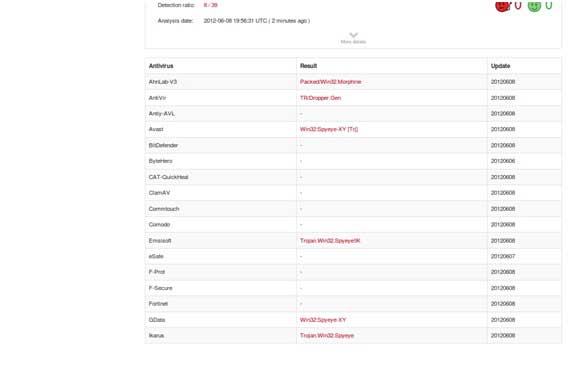
| Submission to VirusTotal, confirms the dumped executable as component of "SpyEye" |
 |
| Step 10: Can we get more info? |
| Strings extracted from the dumped executable, show reference to interesting artifacts (executable and the registry key), it also shows the path to the suspicious executable B6232F3A9F9.exe. |
 |
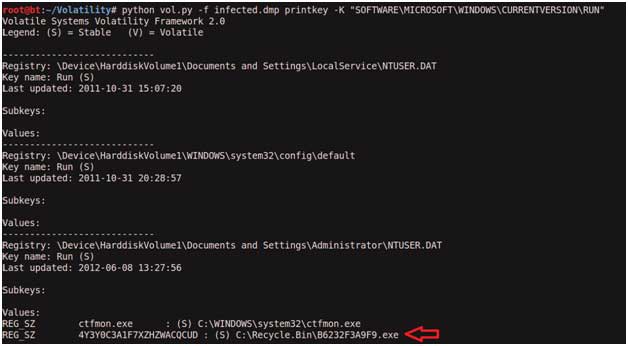
| Step 11: Printing the Registry Key |
| Printing the registry key determined from the above step(step 10) shows that, malware creates registry key to survive the reboot |
 |
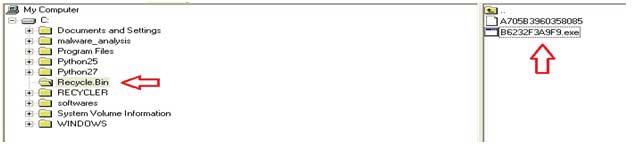
| Step 12: Finding the Malicious EXE on Infected Machine |
| Now that we know the path to the suspicious executable, lets find it on the infected machine. Finding malicious sample from infected host and virustotal submission confirms SpyEye infection. |
 |
 |
| Conclusion |
| Memory forensics is a powerful technique and with a tool like Volatility
it is possible to find and extract the forensic artifacts from the
memory which helps in incident response, malware analysis and reverse
engineering. Security X Upload |


No comments